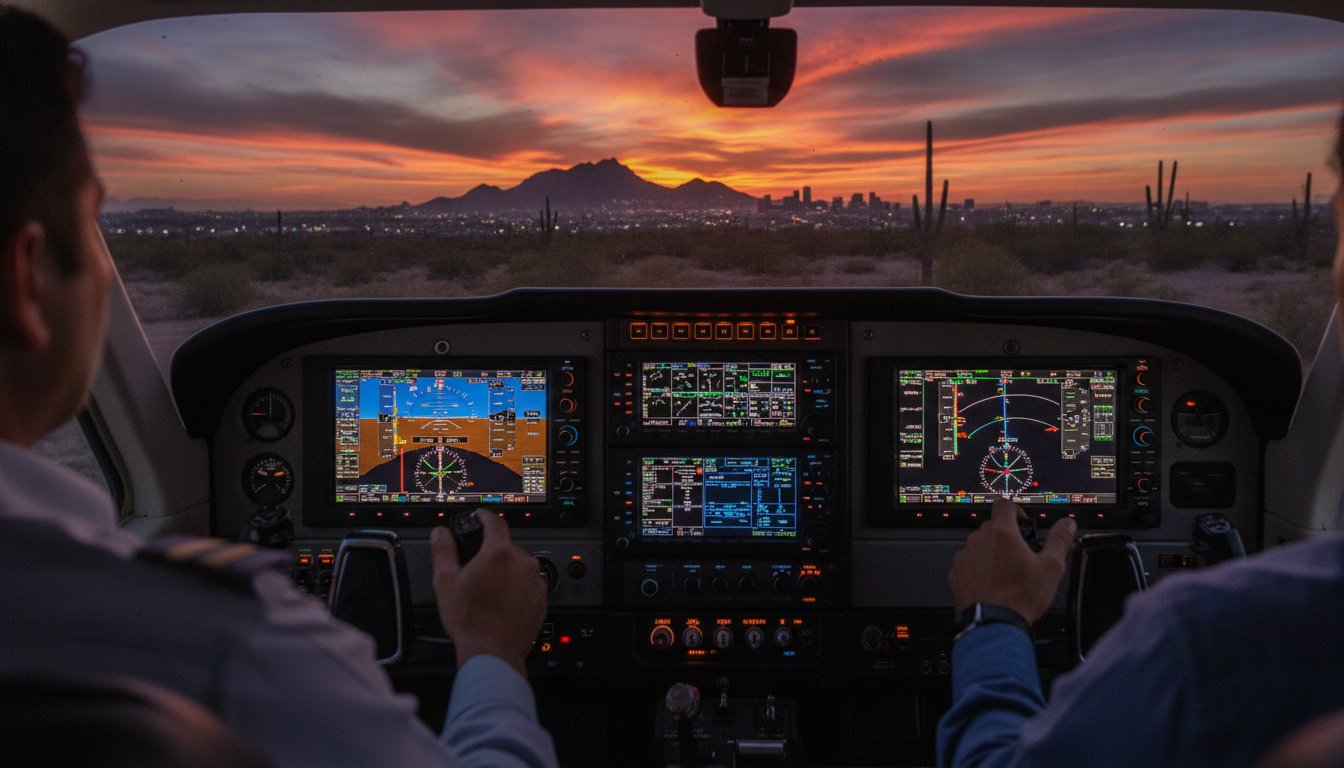
Mastering the Garmin GFC 500 Autopilot: A Step-by-Step Training Guide for Arizona Pilots
What if the most dangerous moment in your flight isn't a mechanical failure, but the second you press "engage" on an autopilot you don't fully understand? It's a common feeling for many pilots navigating the complex, high-traffic corridors of the Phoenix Valley. You find yourself staring at the GFC 500 mode controller, wondering if the "ARM" indication will actually capture the glideslope or if the nose is about to pitch for a sudden, unexpected excursion. Confusion between armed and active modes is more than an annoyance; it's a safety risk during critical phases of flight.
This guide simplifies the complexity of Garmin G3X autopilot training Arizona pilots need to stay ahead of the aircraft. You'll learn how to master mode logic, leverage Electronic Stability and Protection (ESP) safety features, and transform the GFC 500 into a reliable flight deck partner. We'll break down the transition from manual flight to automated precision, focusing on the specific operational nuances of our G3X-equipped Cessna 172P and Twin Comanche to help you reduce cockpit workload during your next IFR cross-country.
Key Takeaways
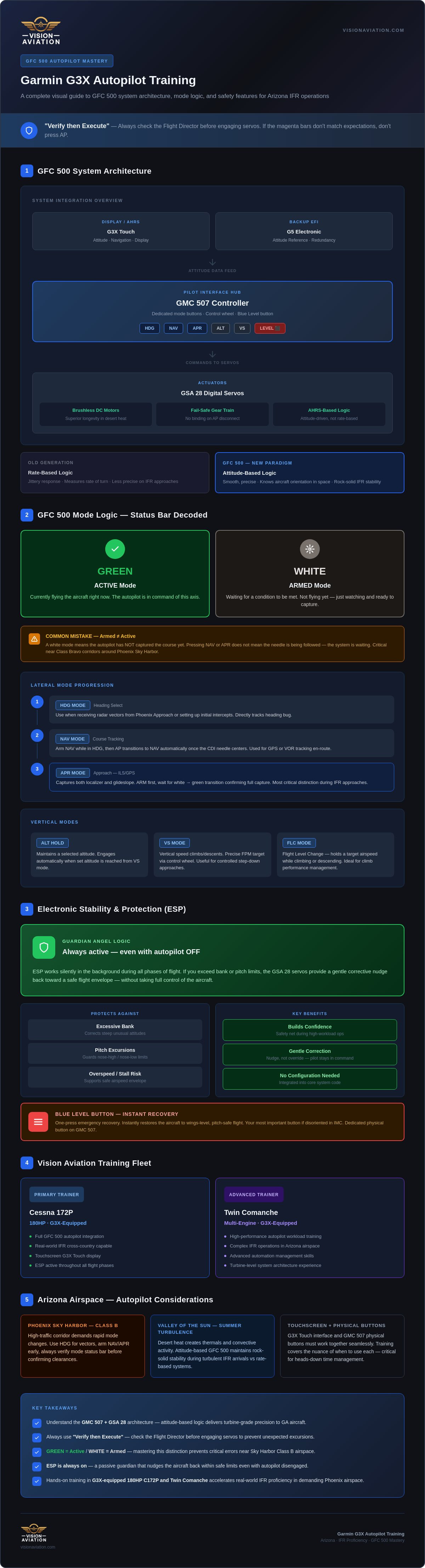
- Understand the core architecture of the GFC 500, including the GMC 507 controller and GSA 28 servos, to build a foundation for technical mastery.
- Adopt a "Verify then Execute" mindset by always referencing the Flight Director before engaging servos to eliminate unexpected pitch or roll excursions.
- Discover why specialized Garmin G3X autopilot training Arizona is essential for managing the seamless transition between touchscreen commands and physical mode buttons.
- Learn tactical strategies for managing automation in the busy Phoenix airspace and maintaining flight precision during the "Valley of the Sun" summer turbulence.
- Explore how hands-on instruction in a G3X-equipped 180HP Cessna 172P or Twin Comanche accelerates your journey toward real-world IFR proficiency.
Understanding the Garmin GFC 500 Autopilot System Architecture
The Garmin GFC 500 represents a paradigm shift for light piston aircraft. It's a fully digital, attitude-based system that replaces the jittery, rate-based logic of previous generations. For those seeking Garmin G3X autopilot training Arizona, understanding this architecture is the first step toward IFR proficiency. This system doesn't just follow a heading; it understands the aircraft's exact orientation in space. By leveraging the same technology found in high-end turbine aircraft, the GFC 500 brings a level of precision to the cockpit that was previously unavailable to the general aviation pilot.
The system architecture relies on seamless integration with either a G5 electronic flight instrument or the G3X Touch display. This connection provides the necessary attitude data to the autopilot, ensuring the system knows which way is up at all times. By combining the GMC 507 controller with the GSA 28 servos, Garmin has created a suite that is both redundant and highly responsive. This integration is why we've chosen this specific suite for our training fleet, including our high-performance 180HP Cessna 172P.
The Role of the GMC 507 Controller
The GMC 507 is the heartbeat of the pilot interface. It's a dedicated controller that lives right where you need it, providing tactile feedback that touchscreens simply can't match. You get dedicated mode buttons for HDG, NAV, and APR, allowing for rapid mode changes during busy approach phases. The control wheel is a standout feature; it allows for precise adjustments to pitch, roll, and airspeed targets without fumbling through menus. Perhaps the most vital feature is the blue "Level" button. It's a dedicated recovery tool that instantly restores the aircraft to straight-and-level flight if you ever find yourself disoriented in the clouds.
Digital Servos and the GSA 28 Advantage
Reliability is paramount when flying in the demanding desert heat. The GSA 28 servos use brushless DC motors, which offer superior longevity and smoother response compared to brushed alternatives in 2026. These servos are designed with a fail-safe internal gear train. If the autopilot disengages, you won't feel any control surface binding or resistance. An attitude-based autopilot utilizes high-speed data from an Attitude and Heading Reference System (AHRS) to drive control surface movements based on the aircraft's orientation in space rather than its rate of turn. This results in smoother transitions and rock-solid stability during turbulent IFR arrivals.
Safety isn't an afterthought; it's integrated into the core code. Garmin ESP (Electronic Stability and Protection) works in the background even when the autopilot is off. If you exceed bank or pitch limits, the servos provide a gentle nudge back to a safe flight envelope. This "guardian angel" logic is a core reason why we emphasize safety in our Garmin G3X autopilot training Arizona programs, utilizing this technology in both our Cessna 172P and Twin Comanche training platforms. ESP doesn't just prevent stalls or overspeeds; it builds pilot confidence by providing a safety net during high-workload maneuvers.
A Step-by-Step Guide to Garmin GFC 500 Mode Logic
Success with the GFC 500 begins with a "Verify then Execute" philosophy. Before you ever engage the servos, you must command the Flight Director (FD) to show you exactly where the autopilot wants to go. If the magenta bars don't match your expectations, don't press the AP button. This simple habit prevents those heart-pounding "what's it doing now?" moments that often plague pilots during Garmin G3X autopilot training Arizona. It's about moving from a reactive state to a proactive one where you're always one step ahead of the automation.
Look at the top of your display. This is the status bar, and it functions as your primary source of truth. Modes displayed in green are active; they are currently flying the aircraft. Modes displayed in white are armed; they're simply waiting for a specific condition to be met before taking control. A common mistake is assuming the autopilot will capture a course just because you pressed a button. If the mode is white, the system is just watching and waiting for the needle to center. This distinction is vital when flying tight patterns near the busy Class Bravo corridors of Sky Harbor.
Lateral Modes: Heading, Navigation, and Approach
Lateral management follows a logical, three-step progression. Start with HDG mode when receiving vectors from Phoenix Approach or when setting up an initial intercept angle. Once you're cleared for the route, transition to NAV mode. The system will then track your GPS or VOR course with high fidelity. Finally, arm APR mode for the approach. This tells the system to look for both lateral and vertical guidance. It's the moment the autopilot prepares to transition from enroute tracking to the precision of a localizer or glideslope.
Vertical Modes: Pitch, IAS, and Vertical Speed
Vertical logic requires even more discipline than lateral tracking. For climbs, we recommend IAS (Indicated Airspeed) mode. It's the safest way to climb during hot Arizona summers because it prevents the aircraft from pitching up into a stall if climb performance is limited by density altitude. For descents, switch to VS (Vertical Speed) mode to manage your rate precisely during step-downs. Always remember the most critical pitfall: the autopilot will not level off unless you have set the altitude bug correctly. If ALTS isn't armed in white on your status bar, the plane will fly right through your assigned altitude without hesitation.
Mastering these sequences takes dedicated practice in a controlled environment. If you want to refine your flow and eliminate automation surprises, consider booking a session for specialized avionics coaching to bridge the gap between theory and flight. Our instructors focus on these specific mode transitions to ensure you feel like a master of the system, not just a passenger.
Integrating the GFC 500 with G3X Touch Avionics
The G3X Touch is more than a display; it's the primary visual feedback loop for every decision the GFC 500 makes. It translates complex digital logic into clear, graphical data that you can process at a glance. While the GMC 507 controller provides the tactical buttons for mode selection, the G3X screen offers the rich context needed to visualize your flight path. Mastering the scan between these two components is a cornerstone of Garmin G3X autopilot training Arizona pilots receive to ensure they remain the pilot-in-command, not just a passenger. This integration allows you to see exactly how the aircraft plans to intercept a course or capture a glideslope before the servos ever move a control surface.
The Flight Director (FD) cues on the G3X are your most vital tool for precision. These magenta command bars act as a bridge between manual and automated flight, showing you exactly where the autopilot wants to fly the plane. When you're hand-flying an approach, following these bars ensures you are flying with the same precision as the automation itself. During an IFR arrival into a busy airport like Deer Valley or Scottsdale, the G3X clearly displays glideslope and localizer arming at the top of the PFD. Seeing that white "GS" or "LOC" gives you the peace of mind that the system is ready to capture the final approach course as soon as the needles begin to move.
Synchronizing the PFD and Autopilot
Efficiency in the cockpit comes down to how quickly you can translate ATC instructions into avionics settings. The G3X Touch allows for rapid synchronization of heading, altitude, and airspeed bugs through intuitive touchscreen shortcuts. Tapping the altitude tape or heading indicator on the screen brings up a keypad for instant entry, which is often faster than spinning physical knobs during high-workload phases. Understanding this layout is essential, especially when Mastering the Cessna 172P: The Premier 180HP G3X Rental in Phoenix. The 180HP engine and modern panel require a pilot who can manage information as quickly as the aircraft performs.
ESP and Underspeed Protection
Safety features like Electronic Stability and Protection (ESP) and Underspeed Protection are deeply integrated into the G3X visual interface. When ESP becomes active to correct an excessive bank or pitch angle, the G3X alerts you with a clear visual indication, ensuring you understand why the controls are providing feedback. Underspeed Protection is perhaps the most critical safety net; if you forget to add power during a level-off, the GFC 500 will automatically pitch the nose down to maintain a safe flying speed. This prevents a stall even if the autopilot remains engaged. Our Garmin G3X autopilot training Arizona programs focus heavily on these visual cues, teaching you to distinguish between a standard "Autopilot Disengaged" chime and an "ESP Active" alert, keeping you ahead of the aircraft at all times.
Best Practices for Autopilot Management in Arizona Airspace
Phoenix airspace doesn't forgive hesitation. Between the busy corridors of Deer Valley and the high-performance departures from Chandler, you need a system that works with you, not against you. Garmin G3X autopilot training Arizona pilots receive at Vision Aviation emphasizes this synergy. The intense summer heat creates thermal turbulence that can challenge even the most robust digital servos. Managing the GFC 500 during these "Valley of the Sun" bumps requires understanding when to let the autopilot work and when to take the reins. A "Pilot-in-the-Loop" philosophy is your best defense against automation surprise. Never let the autopilot take you somewhere you haven't already arrived at mentally.
Automation surprise often occurs when a pilot becomes a spectator. If you're on a busy departure and ATC changes your climb gradient or heading, your hands should move to the GMC 507 before the radio call is even finished. You are the manager of the automation. If the system's behavior doesn't match your mental model of the flight, disconnect and fly manually. This keeps you sharp and ensures the aircraft always does exactly what you intend.
Handling Phoenix Approach Vectors
Transitioning from a GPS arrival to radar vectors requires a smooth, practiced flow. When Phoenix Approach breaks you off a transition, you must switch from NAV to HDG mode instantly. We teach our students to use the "Sync" function by pressing the heading knob to align the bug with the current track before making adjustments. This prevents the aircraft from banking sharply in the wrong direction. Managing altitude step-downs is equally critical, especially when descending over the high terrain north of the valley. The GFC 500 makes these constant changes manageable, allowing you to focus on the big picture rather than chasing needles.
Autopilot Use in High-Density VFR Traffic
In the high-density VFR environment near Luke AFB or the practice areas, your primary job is looking for other aircraft. The GFC 500 is a powerful tool for keeping your "eyes outside." By offloading the task of maintaining altitude and heading to the G3X system, you can dedicate more brainpower to traffic avoidance. If you ever feel overwhelmed or lose situational awareness in a busy pattern, the "Level" button is your ultimate safety net. The GFC 500 significantly reduces pilot fatigue during long Arizona cross-countries, ensuring you arrive at your destination with the mental clarity needed for a safe landing. If you're ready to master these high-traffic flows under expert guidance, explore our IFR and avionics training programs to build real-world confidence.
Transitioning to Glass: Advanced Autopilot Training at Vision Aviation
Vision Aviation is a modern laboratory for professional growth. We believe that training in dated cockpits creates a knowledge gap that today's career pilots cannot afford. Our Garmin G3X autopilot training Arizona program is built around the same high-end technology found in modern corporate and commercial flight decks. Our instructors are local experts who understand how to navigate the complex Phoenix corridors while managing the precision of a digital autopilot. We don't just teach you which buttons to push; we mentor you in the sophisticated art of automation management.
Our curriculum is designed for rapid proficiency. We move beyond the basic manuals to provide real-world insights that only come from thousands of hours in the Valley of the Sun. By the time you complete your transition, the GFC 500 will feel like a natural extension of your own flight logic. This mastery is essential for any pilot looking to reduce their workload during high-stress IFR operations or long-distance cross-country flights.
Our G3X-Equipped Training Fleet
Our fleet is a testament to our commitment to quality and safety. The 180HP Cessna 172P serves as our primary platform for single-engine GFC 500 mastery. This aircraft is a high-performance machine optimized for the demanding density altitudes of the Southwest. For those pursuing multi-engine goals, our Twin Comanche features the same Garmin Glass logic. This consistency across our fleet is a major advantage for our students. You can move from single-engine to multi-engine training without relearning the avionics architecture. You spend less time staring at the panel and more time refining your IFR procedures and multi-engine flows.
- Consistency: The same G3X and GFC 500 logic across all training platforms.
- Performance: 180HP Cessna 172P provides the power needed for Arizona summers.
- Modernity: Train on the same equipment used in the latest generation of general aviation aircraft.
Enroll in a Glass Cockpit Transition Course
Your journey into advanced automation begins with a structured transition course. During your first five hours of GFC 500 training, we focus on building the "Verify then Execute" mindset we've detailed throughout this guide. We start with ground-based logic drills before taking those skills into the busy Phoenix practice areas. This preparation is vital for your IFR checkride. Examiners today look for pilots who can use advanced automation to enhance safety, not as a crutch for poor stick-and-rudder skills.
We ensure you are ready for every phase of flight, from the initial departure climb in IAS mode to the final glideslope capture. If you are ready to elevate your skills and fly with the precision of a professional, schedule your Garmin GFC 500 checkout with Vision Aviation today. Our team is ready to help you master the skies with the most advanced Garmin G3X autopilot training Arizona has to offer.
Elevate Your Flight Deck Mastery
Mastering the GFC 500 is about more than just knowing where the buttons are. It's about developing the technical discipline to manage complex mode logic while navigating the high-traffic corridors of the Southwest. By understanding the digital architecture and integrating a "Verify then Execute" mindset, you'll transform from a passenger into a confident manager of automation. This transition is essential for any pilot aiming for professional-level IFR proficiency and reduced cockpit workload during demanding cross-countries.
At Vision Aviation, we provide the modern tools and expert mentorship needed to bridge the gap between basic operation and total system command. Our fleet of G3X Touch and GFC 500 equipped aircraft, combined with our Phoenix-based expert flight instructors, ensures you receive the most relevant Garmin G3X autopilot training Arizona has to offer. Whether you're enrolled in our specialized IFR or multi-engine programs, we focus on real-world application to prepare you for the future of flight.
Book your GFC 500 training session in Phoenix now and take the next step in your aviation journey. The freedom of the skies is waiting for those who fly with precision and confidence.
Frequently Asked Questions
Is the Garmin GFC 500 autopilot difficult for a student pilot to learn?
Learning the GFC 500 is not difficult, but it requires a methodical approach to mode logic. Most student pilots find the visual interface of the G3X Touch more intuitive than older, button heavy systems. The challenge lies in understanding the "Armed" versus "Active" status, which is why we incorporate these concepts early in our Garmin G3X autopilot training Arizona programs to build a solid foundation from the start.
Does the GFC 500 work if my primary flight display (PFD) fails?
The GFC 500 is designed with redundancy in mind. If your G3X PFD fails, the autopilot can continue to receive attitude data from a secondary source, such as a Garmin G5 or another standby instrument. This cross fill capability ensures that you don't lose your primary safety tool in an emergency. It's a core reason why we emphasize technical redundancy and backup scans during our advanced avionics sessions.
What is Garmin ESP, and do I need the autopilot on for it to work?
Garmin ESP (Electronic Stability and Protection) is a safety feature that functions specifically when the autopilot is disconnected. It monitors your bank and pitch angles. If you exceed safe limits, the servos provide a gentle, corrective force to nudge the aircraft back to level flight. It's a "guardian angel" system that helps prevent stalls or overbank situations without requiring any pilot input to activate.
Can I use the GFC 500 for a fully coupled ILS approach in Phoenix?
You can absolutely use the GFC 500 for fully coupled ILS and GPS approaches at airports like Sky Harbor or Deer Valley. The system tracks the localizer and glideslope with high precision, allowing you to monitor the flight path while the automation manages the needles. This capability is a focal point of our IFR training, helping you stay ahead of the aircraft during high workload arrivals.
How does the "Level" button work in an emergency situation?
The blue "Level" button on the GMC 507 controller is a dedicated recovery tool for emergency situations. When pressed, the autopilot instantly engages and returns the aircraft to straight and level flight from any attitude. It's designed to assist pilots who may experience spatial disorientation or become overwhelmed. It provides an immediate safety net that restores control while you regain your situational awareness and plan your next move.
What is the difference between the Garmin GFC 500 and the GFC 600?
The GFC 500 is specifically tailored for light piston aircraft, while the GFC 600 is built for higher performance twins and turboprops with more robust servos and environmental sealing. The 600 often includes additional features like a dedicated yaw damper as standard. For most general aviation pilots in the Phoenix area, the GFC 500 provides all the necessary precision and safety features required for safe and reliable IFR flight.
Do I need special flight instruction to use the GFC 500 legally?
There is no specific FAA regulatory requirement for a "type rating" on the GFC 500, but most insurance providers and flight schools require a formal transition course. Moving from a traditional six pack or an older rate based autopilot to an attitude based digital system requires a shift in mental logic. We provide structured checkouts to ensure you can safely manage the system's advanced features before flying solo.
Can I rent a Cessna 172 with a GFC 500 in Phoenix for time building?
Yes, you can rent our G3X equipped Cessna 172P for time building or IFR cross country experience. This aircraft features the 180HP engine upgrade, making it an ideal platform for exploring the Southwest while building proficiency with modern automation. Utilizing a high tech panel for time building prepares you for the transition to more complex aircraft and career track roles in your future aviation journey.
