Transition to Glass Cockpit Training: A Pilot’s Guide to Mastering Garmin Glass
The most dangerous thing about a modern avionics suite isn't the technology itself, but the pilot who treats it like a high-tech distraction rather than a precision flight tool. Many experienced aviators find that moving from traditional steam gauges to digital displays feels like learning to fly all over again. It's common to feel overwhelmed by the flood of data on a Multi-Function Display or to struggle when digital tapes don't feel as intuitive as the classic circular gauges. If you've ever felt like a "button pusher" instead of a pilot, you're experiencing a standard part of the learning curve.
This is why a structured approach to transition to glass cockpit training is vital for your growth and safety. We'll help you shift your mindset from basic instrument scanning to purposeful information management. You'll learn to master systems like the Garmin G3X or G500 and utilize autopilot integration, such as the GFC 500, to significantly reduce your cockpit workload. This guide provides a clear roadmap for maintaining IFR proficiency while flying the most advanced light aircraft technology available today.
Key Takeaways
- Understand the structured roadmap for a successful transition to glass cockpit training, shifting your focus from individual gauges to integrated information management.
- Discover how the Garmin G3X suite serves as a bridge between general aviation and commercial flight decks with its intuitive Primary Flight Display.
- Learn to identify and prevent "automation surprise" by mastering the underlying logic of digital systems rather than simply memorizing button sequences.
- Follow a proven five-step progression that moves from software familiarization into real-world VFR maneuvers and advanced IFR proficiency.
- Leverage modern training platforms like the 172P or Twin Comanche to build confidence in a high-tech environment under the guidance of expert mentors.
What is Glass Cockpit Transition Training?
Transitioning to a glass cockpit isn't just about learning where the new buttons are; it's a fundamental evolution in how you perceive and process flight data. At its core, transition to glass cockpit training is the structured process of moving from analog "steam" gauges to integrated digital flight displays. The core objective involves replacing the fragmented "six-pack" scan with a unified workflow centered on the Primary Flight Display (PFD) and Multi-Function Display (MFD). This shift moves you from the role of a manual operator to a sophisticated systems manager.
As we move toward 2026, the industry is reaching a tipping point where legacy analog components are becoming harder to maintain and less compatible with modern airspace requirements. Pilots who understand What is a Glass Cockpit? recognize that digital systems offer a level of reliability that mechanical gyros simply cannot match. This isn't just an upgrade for the sake of technology; it's a move toward a safer, more predictable flying environment. The mental shift required is significant, moving you from interpreting individual needles to managing a high-speed stream of integrated data.
From Analog to Digital: The Mental Leap
Moving from circular gauges to digital vertical tapes requires your brain to process information differently. On a traditional altimeter, you look at the position of a needle; on a PFD, you monitor a rolling tape. Digital displays provide trend vectors, which are small magenta lines that predict where your airspeed or altitude will be in six seconds. Mastering this allows you to stay ahead of the airplane with less effort. You stop "looking" for information and start "monitoring" automated systems. This transition is often the hardest part of transition to glass cockpit training, but it's where true proficiency begins.
The Glass Cockpit Advantage for IFR Pilots
For those flying under Instrument Flight Rules, glass technology is a game changer. Precision is the standard. Digital Attitude and Heading Reference Systems (AHRS) provide rock-solid stability, outperforming old mechanical gyros that were prone to precession and tumbling. Situational awareness reaches new heights with moving maps, real-time weather overlays, and terrain alerts. These tools reduce your workload during high-stress approach phases, allowing you to focus on decision-making rather than struggling to maintain a basic scan. When you aren't fighting the instruments, you have more mental bandwidth to manage the flight safely.
The Garmin G3X Suite: A Modern Standard for Transition
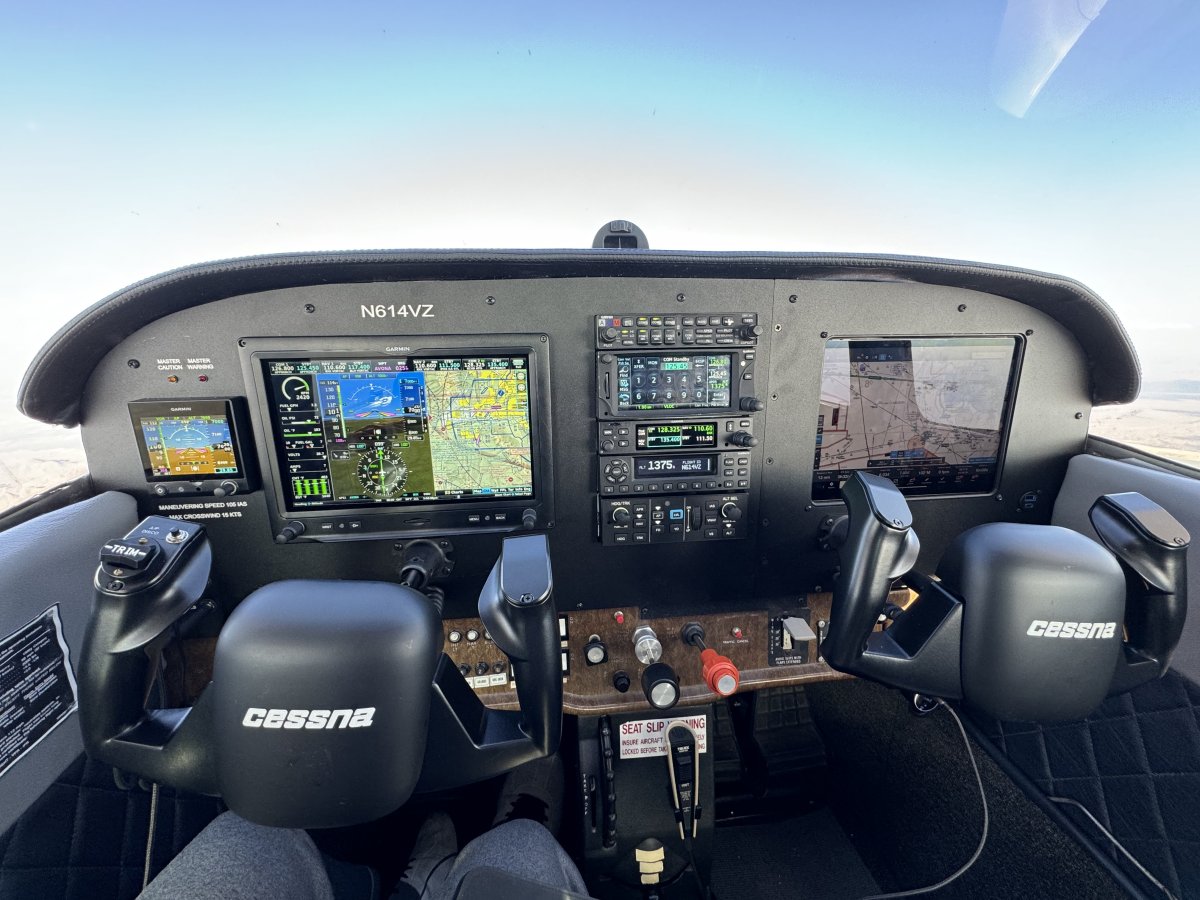
The Garmin G3X Touch has redefined the light aircraft cockpit. It's more than a screen; it's a bridge. For pilots starting their transition to glass cockpit training, it provides the same logic and interface found in high-end commercial flight decks. The Primary Flight Display (PFD) consolidates airspeed, altitude, and vertical speed into clean, vertical tapes. This layout allows for a "glance" scan rather than the old circular sweep. Meanwhile, the Multi-Function Display (MFD) handles the heavy lifting of engine monitoring (EIS), active traffic alerts, and real-time weather integration, keeping you informed without cluttering your view.
Training on this hardware requires an airplane that matches the tech. You can master these systems in our Single Engine 172P (180HP) or step up to the Multi Engine Twin Comanche, both equipped with full Garmin Glass suites. It's important to recognize that while this tech is powerful, it demands respect. An NTSB Safety Study on Glass Cockpits points out that specialized training is key to realizing the safety benefits of these systems. Without it, the tech can become a distraction. If you're ready to start your journey, exploring our advanced training fleet is the best first step toward mastery.
Mastering the Touchscreen Interface
Touchscreens are intuitive on the ground but can be tricky in light chop. Garmin designed the G3X with a physical bezel that acts as a hand-brace, allowing you to stabilize your finger while navigating menus. You'll learn to manage menu nesting so you can find frequencies or flight plan edits without excessive "head-down" time. Customizing the display for your specific mission, whether a short hop or a cross-country IFR flight, ensures the most critical data is always front and center. This personalization makes the cockpit feel like an extension of your own thought process.
Integrating the Garmin GFC 500 Autopilot
The GFC 500 isn't just a luxury; it's a safety tool. One of its most vital features is the "Blue Level Button," which can automatically restore the aircraft to straight-and-level flight if you experience spatial disorientation. During transition to glass cockpit training, you'll practice how the GFC 500 interacts with the G3X for coupled approaches, allowing the system to fly the glidepath while you monitor the environment. Managing autopilot modes effectively means you're always telling the airplane what to do next, rather than wondering what it's doing now. This synergy between pilot and machine is the hallmark of a modern aviator.
Managing Information Overload and the "Button Pusher" Trap
The greatest fear for an experienced aviator moving away from steam gauges is becoming a "button pusher." It's a valid concern. When the cockpit is filled with high-resolution displays and endless menus, it's easy to let stick-and-rudder fundamentals slip. However, a successful transition to glass cockpit training teaches you that technology is a tool, not a replacement for basic airmanship. The goal isn't to let the airplane fly you. The goal is to use the digital suite to enhance your decision-making and precision.
One of the most critical concepts to master is "Automation Surprise." This happens when the aircraft performs an action that the pilot didn't expect, often because a mode was armed incorrectly. To prevent this, we adhere to the FAA/Industry Training Standards (FITS), which emphasizes scenario-based training. By practicing real-world scenarios rather than just memorizing button sequences, you learn the underlying logic of the system. This ensures that you are always the one in command, anticipating the next move of the avionics suite.
Effective glass cockpit management requires a split focus between strategic and tactical flying. Your Primary Flight Display (PFD) handles the tactical "now", including airspeed, altitude, and attitude. Your Multi-Function Display (MFD) is for strategic planning, such as fuel management, weather avoidance, and long-range navigation. By separating these tasks, you avoid the trap of staring at a single screen for too long, which is essential for maintaining a healthy outside scan.
Situational Awareness in Busy Phoenix Airspace
Flying in the Valley presents unique challenges. Between the mountainous terrain and the high-density traffic near Sky Harbor, your workload can skyrocket. Synthetic vision on the G3X acts as a powerful safety net, providing a 3D representation of terrain even in low visibility. Integration with Traffic Information Service (TIS-B) allows you to see nearby aircraft directly on your map. This level of awareness simplifies complex IFR clearances and makes navigating busy airspace feel significantly more manageable.
The "Dark Cockpit" Philosophy
A "Dark Cockpit" doesn't mean the lights are off; it means the system only tells you what you need to know when you need to know it. During your transition to glass cockpit training, you'll learn to filter out non-essential data during critical flight phases like takeoff and landing. The G3X uses a tiered system for alerts, warnings, and cautions to prevent sensory overload. We also train for the unlikely, such as reversionary modes. If a screen goes blank, you need to know exactly how to move critical flight data to the remaining display instantly.
The 5-Step Roadmap to Glass Cockpit Proficiency
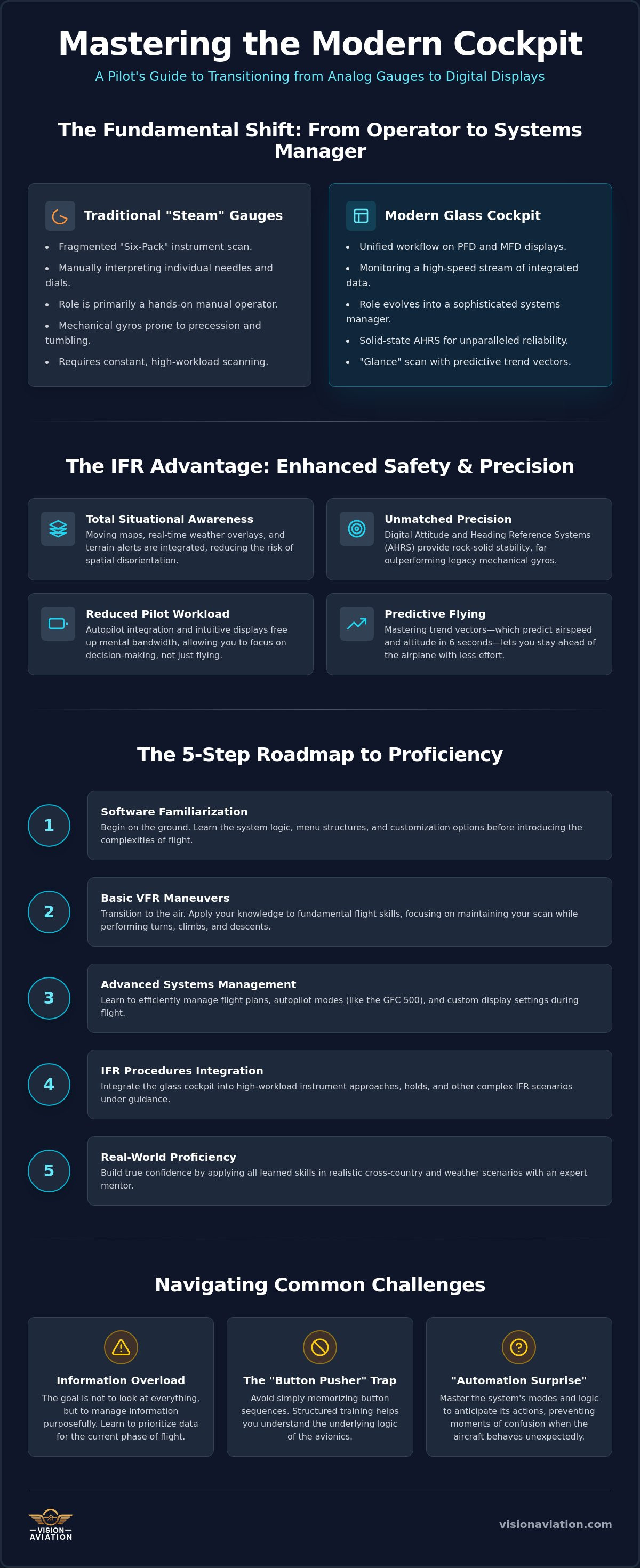
Mastery of a digital flight deck doesn't happen by accident. It requires a methodical progression that moves you from being a student of the software to a commander of the aircraft. A successful transition to glass cockpit training follows a logical path, ensuring that each new skill builds upon a solid foundation of safety and technical understanding. This isn't just about learning where the buttons are; it's about building the muscle memory and mental framework required to fly with precision in any environment.
- Step 1: Ground School & Software Familiarization. You start by using PC trainers or iPad apps to master the Garmin FMS logic before you ever step into the cockpit.
- Step 2: VFR Basics. Once in the air, you'll focus on mastering your new instrument scan while performing basic maneuvers like steep turns and stalls to build confidence.
- Step 3: Autopilot Integration. You'll learn the various modes of the GFC 500, focusing on how the system manages vertical and lateral navigation.
- Step 4: IFR Procedures. This phase involves executing both coupled and uncoupled approaches, using digital charts and high-resolution overlays for maximum situational awareness.
- Step 5: Emergency Scenarios. True proficiency is tested during system failures, where you'll practice using backup instruments and managing screen reversions.
Ground Prep: The "Chair Flying" of the 21st Century
Modern aviators know that the most cost-effective training happens on the ground. Using a Garmin simulator allows you to explore the depths of the flight management system without the distractions of ATC or turbulence. You'll learn the specific knob logic required to enter flight plans and modify waypoints quickly. Ground familiarity reduces in-flight stress by 50% because it allows your brain to focus on aircraft control while your hands navigate the interface through pure muscle memory.
In-Flight Proficiency Maneuvers
In the air, the focus shifts to your physical scan. You'll move from the traditional "T" scan to "the Tape," learning to process airspeed and altitude in a vertical format. We emphasize "heads-up" programming, which means you fly the airplane first and the computer second. This approach ensures you never lose track of your primary responsibility: keeping the blue side up. You can refine these skills and gain real-world cross-country IFR experience by booking a session with Vision Aviation today.
Why Choose Vision Aviation for Your Glass Transition in Phoenix?
Phoenix stands as a premier global hub for aviation. With more than 300 days of sunshine each year and a sophisticated airspace network, it provides the perfect backdrop for a transition to glass cockpit training. Vision Aviation operates within this dynamic environment, offering a training experience that combines high-tech equipment with a supportive, professional atmosphere. We focus on turning pilots into systems experts who can handle the complexities of modern flight with ease. Training here means you're learning in the same environment used by major airlines and high-performance flight schools worldwide.
Our training fleet is designed to meet the highest industry standards. You'll train in the Single Engine 172P (180HP) or the Multi Engine Twin Comanche, both of which are equipped with the latest Garmin Glass Avionics Suites. These aircraft allow you to practice everything from basic VFR maneuvers to complex IFR procedures in a high-performance environment. Our instructors aren't just teachers; they're expert mentors who specialize in avionics integration and IFR mastery. They ensure that you don't just learn the "how," but also the "why" behind every system function, building a level of confidence that only comes from true understanding.
Multi-Engine Time Building with Advanced Avionics
For pilots aiming for a professional career, building multi-engine time is essential. Doing so in our Garmin-equipped Twin Comanche offers a level of preparation that traditional analog trainers can't match. You'll gain hands-on experience with the same glass-cockpit logic found in modern regional jets. This time building isn't just about logging hours. It's about developing cross-country IFR experience that prepares you for the rigors of commercial aviation. By the time you reach a professional flight deck, the transition will feel natural because you've already mastered the foundational technology in a multi-engine environment.
Start Your Modern Aviation Journey Today
Vision Aviation is dedicated to your success and safety. From Private Pilot Training to advanced multi-engine experience, our programs are tailored to fit your unique journey. We provide a methodical, purposeful approach to learning that respects the gravity of the industry while celebrating the thrill of flight. Our commitment to technical excellence means you're always flying well-maintained, modern aircraft. Booking a session or a discovery flight is the first step toward reaching your goals in a modern, high-tech cockpit. Schedule your glass cockpit transition training with Vision Aviation and take command of your future in the skies.
Take Command of the Digital Sky
Mastering a digital flight deck is more than a simple hardware upgrade; it's a fundamental advancement in your capabilities as a pilot. By moving beyond basic scanning and embracing sophisticated information management, you unlock a higher level of situational awareness and safety. Your transition to glass cockpit training represents the bridge between traditional airmanship and the future of flight. It's a journey that requires professional mentorship and the right equipment to ensure every hour in the logbook translates to real-world proficiency.
Vision Aviation provides the elite environment you need to succeed. With a modern fleet featuring the Garmin G3X suite and GFC 500 autopilot, you'll train on the cutting edge of technology. Whether you're mastering IFR procedures in our Single Engine 172P or building advanced hours in our specialized Twin Comanche with Garmin Glass, our Phoenix-based instruction is designed for your long-term growth. The skies are waiting for a pilot who's ready to lead with confidence.
Master the modern cockpit-book your transition training at Vision Aviation
Frequently Asked Questions
How many hours does it take to transition to a glass cockpit?
Most pilots achieve a solid baseline of proficiency in 5 to 10 hours of dedicated flight time. This duration depends heavily on your previous experience and the amount of ground study you complete before the first flight. A structured transition to glass cockpit training program ensures you spend those hours mastering system logic rather than just guessing at menus in the air.
Is it harder to learn to fly in a glass cockpit than with steam gauges?
It isn't necessarily harder, but the mental workload shifts significantly. While steam gauges require your brain to construct a 3D picture from several 2D needles, glass cockpits provide that situational awareness for you. The new challenge involves managing the high volume of digital data and ensuring you don't become a "button pusher" who loses track of basic airmanship.
Can I use a glass cockpit for my Private Pilot checkride?
You can absolutely use a glass cockpit aircraft for your Private Pilot checkride. Designated Pilot Examiners expect you to be proficient in all installed equipment, including the ability to handle a screen failure or sensor glitch. Training in our G3X-equipped 172P prepares you for this by integrating modern technology with standard maneuvers from your very first lesson.
Do I need a specific endorsement for glass cockpit flying?
There is no specific FAA endorsement required solely for flying a glass cockpit. However, almost all flight schools and insurance providers require a formal transition checkout before you fly solo. This process ensures you understand the specific system logic, autopilot modes, and emergency reversionary procedures before you take command of a technically advanced aircraft.
Will learning on a Garmin G3X help me in a professional pilot career?
Mastering the Garmin G3X is a major career advantage for any aspiring professional. The underlying logic of the Flight Management System (FMS) and the integrated autopilot closely mirrors the avionics suites found in modern regional and major airline flight decks. Building this foundation early makes your future transition to heavy jets much more intuitive and successful.
What happens if the glass cockpit screens fail during flight?
Modern digital systems are designed with layers of redundancy. If a Primary Flight Display fails, the system enters a reversionary mode that automatically moves critical flight data to the remaining Multi-Function Display. Our aircraft are also equipped with independent backup instruments to ensure you maintain control and situational awareness even if the primary electronic system experiences a total power loss.
Is glass cockpit training more expensive than traditional flight school?
Hourly rates for advanced aircraft might be slightly higher, but the training is often more efficient. The precision of transition to glass cockpit training can actually lead to faster mastery of complex IFR maneuvers and better situational awareness. Investing in modern technology often pays off by producing a more capable pilot who can handle high-stress environments with greater ease.
Can I rent Vision Aviation aircraft after completing my transition training?
Yes, we encourage our students to continue their aviation journey with our fleet. Once you successfully complete your transition training and a standard rental checkout, you'll have access to our modern aircraft. This includes our G3X-equipped Single Engine 172P and our Twin Comanche for your personal travel or continued professional time building needs.
